

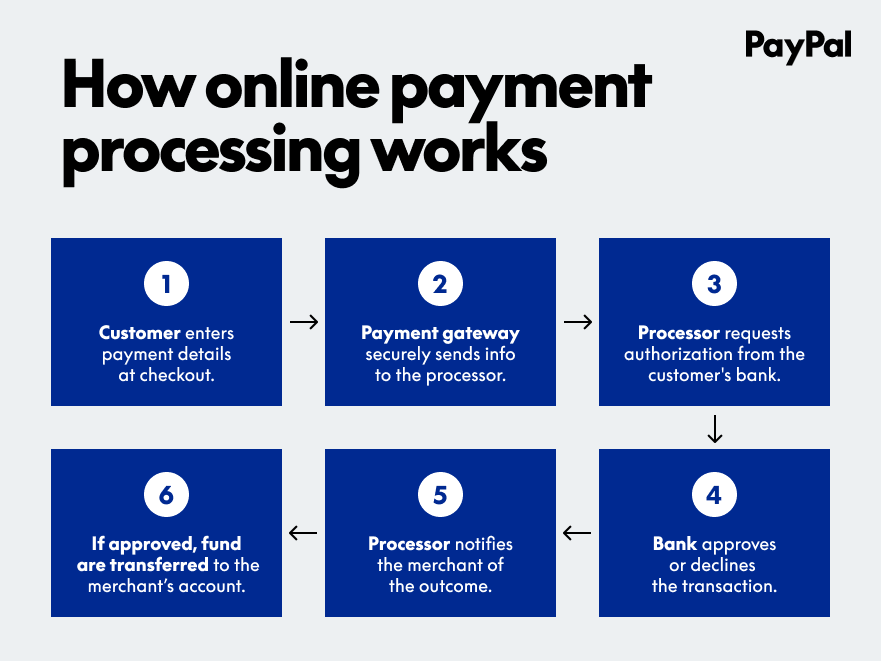
What Does PayPal Payout Pending Mean?
PayPal payout pending means PayPal has started sending the payout, but the money has not yet been fully processed or released. The funds are temporarily held while PayPal completes security checks, verification, or internal processing.
This commonly affects freelancers, affiliates, creators, gig workers, and businesses receiving automated or bulk payouts.
What Happens When a PayPal Payout Is Pending?
If your payout is pending, you may notice:
- ⏳ Money not available in your PayPal balance
- 🏦 Bank transfer not started
- 📄 Status showing “Pending” or “Processing”
- ❌ No option to withdraw or cancel
Your money is safe. It is not lost or reversed, only delayed.
Common Reasons for PayPal Payout Pending
1. Security or Compliance Review
PayPal may hold payouts to:
- Prevent fraud
- Review unusual payout activity
- Meet regulatory requirements
2. New or Unverified Account
Pending payouts often occur if:
- Your PayPal account is new
- Email or phone number is not confirmed
- Identity verification is incomplete
3. Bank Account or Card Not Verified
If your linked bank account or debit card is unverified, PayPal may delay releasing the payout.
4. Large or Unusual Payout Amount
A payout much higher than your normal transaction history can trigger an automatic review.
5. Sender Has Not Completed the Payout
Sometimes the company or platform sending the money has not fully processed the payout on their end.
6. Weekend or Bank Holiday Delay
Payouts initiated on weekends or holidays may remain pending until the next business day.
How Long Does PayPal Payout Pending Take?
Typical timelines include:
- Security checks: 24–72 hours
- New account verification: 3–7 business days
- Bank processing: 1–5 business days
- Complex reviews: Up to 10 business days
In rare cases, it may take longer.
How to Fix PayPal Payout Pending (Step-by-Step)
Step 1: Check Notifications
Log in to PayPal and review alerts or messages related to the payout.
Step 2: Complete All Verifications
- Confirm email and phone number
- Verify your bank account or card
- Upload identity documents if requested
Step 3: Review the Resolution Center
Check if PayPal needs additional information from you.
Step 4: Wait for Processing
Most pending payouts clear automatically once checks are complete.
Step 5: Contact PayPal Support
If the payout remains pending for more than 7–10 business days, contact support for clarification.
Can You Cancel a Pending PayPal Payout?
Usually, no. Once a payout is initiated, it cannot be canceled unless the sender stops it before processing is completed.
How to Prevent PayPal Payout Pending Issues
- ✅ Fully verify your PayPal account early
- ✅ Avoid sudden large payout changes
- ✅ Keep accurate personal and bank details
- ✅ Maintain a low dispute and refund rate
- ✅ Use trusted payout platforms
Final Thoughts
A PayPal payout pending status is usually a temporary delay, not a serious issue. By keeping your account verified and monitoring notifications, most payouts are released within a few days without any action needed.
Read More:
PayPal Dispute Opened Meaning: A Clear, Step-by-Step Explanation
PayPal Dispute Resolved Meaning: What It Means and What Happens Next
PayPal Funds Held Temporarily: Meaning, Reasons, and How to Release Them
PayPal Refund Completed Meaning (What Happens Next)
PayPal Claim Denied Meaning | What It Means and What Happens Next